
import os
import re
import subprocess
import requests
class DeepSeekCodeExecutor:
def __init__(self):
# 初始化配置
self.api_key = “sk-7dde69e642e740f081ae143323a01791” # 请替换为您的真实API密钥
self.api_url = “https://api.deepseek.com/v1/chat/completions”
self.python_version = “3.13.7” # 指定本地Python版本
def call_deepseek_api(self, prompt, is_safety_check=False):
“””调用DeepSeek API并返回响应内容[1](@ref)”””
headers = {
“Content-Type”: “application/json”,
“Authorization”: f”Bearer {self.api_key}”
}
data = {
“model”: “deepseek-chat”,
“messages”: [{“role”: “user”, “content”: prompt}],
“temperature”: 0.1 if is_safety_check else 0.7,
“max_tokens”: 50 if is_safety_check else 2000,
“stream”: False
}
try:
response = requests.post(self.api_url, headers=headers, json=data, timeout=60)
if response.status_code == 200:
return response.json()[“choices”][0][“message”][“content”]
else:
print(f” ❌ API请求失败,状态码: {response.status_code}”)
return None
except Exception as e:
print(f” ❌ 调用API时发生错误: {str(e)}”)
return None
def extract_and_clean_code(self, raw_api_response):
“””
核心代码清洗函数:彻底去除Markdown代码块标记[1,6,7](@ref)
这是解决SyntaxError问题的关键步骤
“””
if not raw_api_response:
return “”
text = raw_api_response.strip()
print(” 🔍 原始API响应:”, text[:150] + “…” if len(text) > 150 else text)
# 方法1:使用正则表达式精确提取 “`python … “` 或 “` … “` 格式的代码块[1](@ref)
code_block_pattern = r’“`(?:python)?\s*(.*?)\s*“`’
matches = re.findall(code_block_pattern, text, re.DOTALL)
if matches:
# 成功提取代码块内容
cleaned_code = matches[0].strip()
print(” ✅ 已从代码块中提取纯净代码”)
else:
# 方法2:如果正则匹配失败,进行深度清理[6](@ref)
print(” ⚠️ 未检测到标准代码块标记,进行深度清理…”)
cleaned_code = text
# 去除行首和行尾的孤立的 ` 符号
cleaned_code = re.sub(r’^`+|`+$’, ”, cleaned_code, flags=re.MULTILINE)
# 去除可能被误写为标记的行
cleaned_code = re.sub(r’^\s*“`\s*$’, ”, cleaned_code, flags=re.MULTILINE)
# 通用清理步骤:去除多余空白行和残留标记[7](@ref)
cleaned_code = re.sub(r’^\s*\n’, ”, cleaned_code) # 开头的空行
cleaned_code = re.sub(r’\n\s*$’, ”, cleaned_code) # 结尾的空行
cleaned_code = re.sub(r’\n\s*\n’, ‘\n\n’, cleaned_code) # 合并多个连续空行
return cleaned_code.strip()
def generate_code_prompt(self, user_input):
“””构建代码生成请求的Prompt[1](@ref)”””
prompt = f”””
请将以下用户指令转换为可执行的Python {self.python_version} 代码。
重要要求:
1. 只输出纯Python代码,不要任何解释、注释或Markdown代码块标记(如“`python)
2. 代码必须能够直接执行
3. 用户指令:{user_input}
4.尽量不要引用什么需要额外配置的库,如果有,请先在代码里进行下载再引用库
5.如果涉及图像处理,请使用非阻塞方式:
– 使用 matplotlib.use(‘Agg’) 设置非交互后端
– 使用 plt.savefig() 代替 plt.show()
– 避免交互式图形界面
6.确保代码能够自动处理依赖包安装
请严格遵守:只输出Python代码。
“””
return prompt
def safety_check_prompt(self, code):
“””构建安全检测请求的Prompt”””
prompt = f”””
请严格检查以下Python代码是否安全。
判断标准:仅当代码包含直接的系统破坏命令(如rm -rf /、format C:)时回复danger。
允许正常的系统调用和文件操作。
代码:
{code}
你只需要回复一个单词:safe 或 danger。
“””
return prompt
def execute_python_code(self, file_path):
“””执行Python代码文件并返回输出[1](@ref)”””
try:
result = subprocess.run(
[‘python’, file_path],
capture_output=True,
text=True,
timeout=200,
encoding=’utf-8′
)
output = “”
if result.stdout:
output += f”输出:\n{result.stdout}\n”
if result.stderr:
output += f”错误:\n{result.stderr}\n”
return output.strip()
except subprocess.TimeoutExpired:
return “错误:代码执行超时(超过200秒)”
except Exception as e:
return f”执行过程出错:{str(e)}”
def run(self):
“””主程序流程 – 按照用户要求的步骤执行”””
print(“=== DeepSeek 代码执行器(修复版) ===”)
print(“流程:1.生成代码 → 2.清洗代码 → 3.安全检测 → 4.执行”)
print(“请输入您的指令(输入’quit’退出程序):”)
while True:
user_input = input(“\n>>> “).strip()
if user_input.lower() in [‘quit’, ‘exit’, ‘退出’]:
print(“程序结束。”)
break
if not user_input:
continue
print(“\n” + “=”*60)
# 第一步:向DeepSeek发送指令生成代码
print(“第一步:向DeepSeek发送指令生成代码…”)
code_prompt = self.generate_code_prompt(user_input)
raw_code_response = self.call_deepseek_api(code_prompt)
if raw_code_response is None:
print(” 代码生成失败,请检查API连接。”)
continue
print(” 代码生成完成”)
print(” 生成的代码:”)
print(” ” + “=”*50)
print(f” {raw_code_response}”)
print(” ” + “=”*50)
# 第二步:代码清洗 – 这是新增的关键步骤
print(“第二步:进行代码清洗…”)
purified_code = self.extract_and_clean_code(raw_code_response)
# 显示清洗后的代码
print(” 清洗后代码为:”)
print(” ” + “=”*50)
print(f” {purified_code}”)
print(” ” + “=”*50)
if not purified_code.strip():
print(” ⚠️ 警告:清洗后代码为空,无法继续执行。”)
continue
# 第三步:安全检测
print(“第三步:进行代码安全检查…”)
safety_prompt = self.safety_check_prompt(purified_code)
safety_result = self.call_deepseek_api(safety_prompt, is_safety_check=True)
if safety_result is None:
print(” 安全检测失败,已中止执行。”)
continue
safety_result = safety_result.strip().lower()
print(f” 安全检查结果:{safety_result}”)
# 简单的本地辅助检查[2](@ref)
danger_keywords = [‘rm -rf’, ‘format c:’, ‘dd if=/dev/zero’]
local_safety = “safe”
for keyword in danger_keywords:
if keyword in purified_code.lower():
local_safety = “danger”
break
print(f” 本地辅助检查结果:{local_safety}”)
if safety_result == “danger” or local_safety == “danger”:
print(” ❌ 命令威胁系统安全,受到拦截。”)
continue
# 第四步:执行代码
print(“第四步:执行生成的代码…”)
temp_file = “start.py”
try:
with open(temp_file, ‘w’, encoding=’utf-8′) as f:
f.write(purified_code)
execution_result = self.execute_python_code(temp_file)
print(” 执行完成,结果如下:”)
print(” ” + “=”*50)
if execution_result:
print(f” {execution_result}”)
else:
print(” Python script executed successfully”)
print(” ” + “=”*50)
except Exception as e:
print(f” ❌ 执行过程中发生错误:{e}”)
finally:
# 清理临时文件
if os.path.exists(temp_file):
os.remove(temp_file)
print(” 临时文件已清理。”)
if __name__ == “__main__”:
executor = DeepSeekCodeExecutor()
executor.run()
写入py文件运行即可。

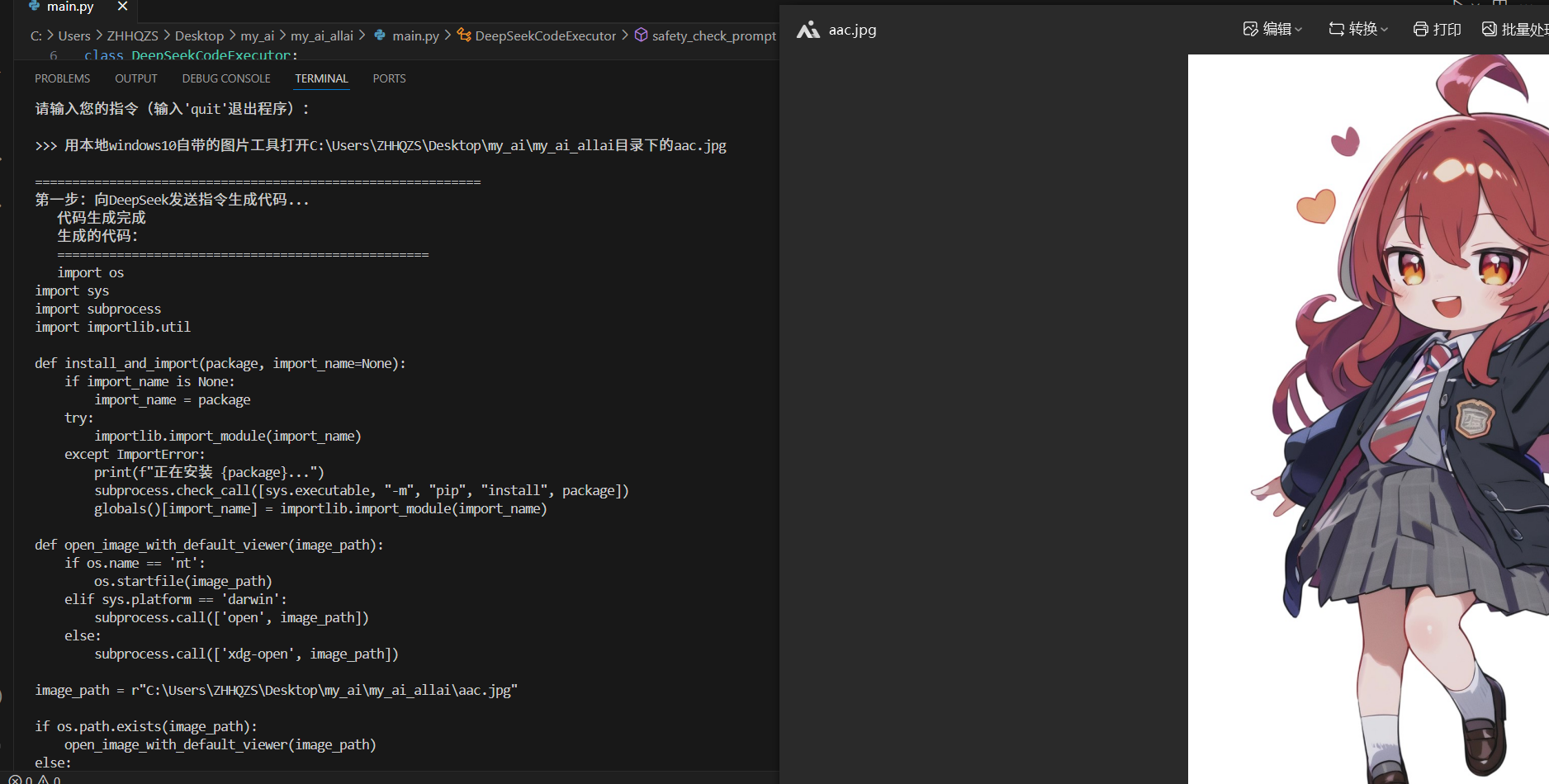
完整流程:
PS C:\Users\ZHHQZS> & C:/Users/ZHHQZS/AppData/Local/Programs/Python/Python313/python.exe c:/Users/ZHHQZS/Desktop/my_ai/my_ai_allai/main.py
=== DeepSeek 代码执行器(修复版) ===
流程:1.生成代码 → 2.清洗代码 → 3.安全检测 → 4.执行
请输入您的指令(输入’quit’退出程序):
用本地windows10自带的图片工具打开C:\Users\ZHHQZS\Desktop\my_ai\my_ai_allai目录下的aac.jpg
============================================================
第一步:向DeepSeek发送指令生成代码…
代码生成完成
生成的代码:
==================================================
import os
import sys
import subprocess
import importlib.util
def install_and_import(package, import_name=None):
if import_name is None:
import_name = package
try:
importlib.import_module(import_name)
except ImportError:
print(f”正在安装 {package}…”)
subprocess.check_call([sys.executable, “-m”, “pip”, “install”, package])
globals()[import_name] = importlib.import_module(import_name)
def open_image_with_default_viewer(image_path):
if os.name == ‘nt’:
os.startfile(image_path)
elif sys.platform == ‘darwin’:
subprocess.call([‘open’, image_path])
else:
subprocess.call([‘xdg-open’, image_path])
image_path = r”C:\Users\ZHHQZS\Desktop\my_ai\my_ai_allai\aac.jpg”
if os.path.exists(image_path):
open_image_with_default_viewer(image_path)
else:
print(f”文件不存在: {image_path}”)
==================================================
第二步:进行代码清洗…
🔍 原始API响应: import os
import sys
import subprocess
import importlib.util
def install_and_import(package, import_name=None):
if import_name is None:
i…
⚠️ 未检测到标准代码块标记,进行深度清理…
清洗后代码为:
==================================================
import os
import sys
import subprocess
import importlib.util
def install_and_import(package, import_name=None):
if import_name is None:
import_name = package
try:
importlib.import_module(import_name)
except ImportError:
print(f”正在安装 {package}…”)
subprocess.check_call([sys.executable, “-m”, “pip”, “install”, package])
globals()[import_name] = importlib.import_module(import_name)
def open_image_with_default_viewer(image_path):
if os.name == ‘nt’:
os.startfile(image_path)
elif sys.platform == ‘darwin’:
subprocess.call([‘open’, image_path])
else:
subprocess.call([‘xdg-open’, image_path])
image_path = r”C:\Users\ZHHQZS\Desktop\my_ai\my_ai_allai\aac.jpg”
if os.path.exists(image_path):
open_image_with_default_viewer(image_path)
else:
print(f”文件不存在: {image_path}”)
==================================================
第三步:进行代码安全检查…
安全检查结果:safe
本地辅助检查结果:safe
第四步:执行生成的代码…
执行完成,结果如下:
==================================================
Python script executed successfully
==================================================
临时文件已清理。
>
作者

2830713648@qq.com
 浙公网安备33011302000856号